
TTSMaker is worth using if you need a downloadable voiceover, want to start without a subscription, and can work within the limits of your chosen voice. For a short explainer, a voicemail greeting, or a few lines of educational narration, it offers a practical route from script to audio.
Longer projects require a closer look. A voice labeled “Unlimited” can still have a strict per-conversion character limit. That distinction matters when your script is ready to publish and you discover that it needs to become several separate recordings.
My preference is to judge a text-to-speech tool by the work between pasting the script and getting a usable file. TTSMaker handles the basic conversion well enough to deserve consideration. Whether it remains the right choice depends on how much splitting, revision, and file management your project requires.
Is TTSMaker Worth Using in 2026?
When TTSMaker Is a Good Fit
The strongest reason to choose TTSMaker is straightforward: you can generate speech and download the result without buying a subscription first. Its free commercial-use permission also makes it relevant to creators producing work for a business, rather than only experimenting with personal audio.
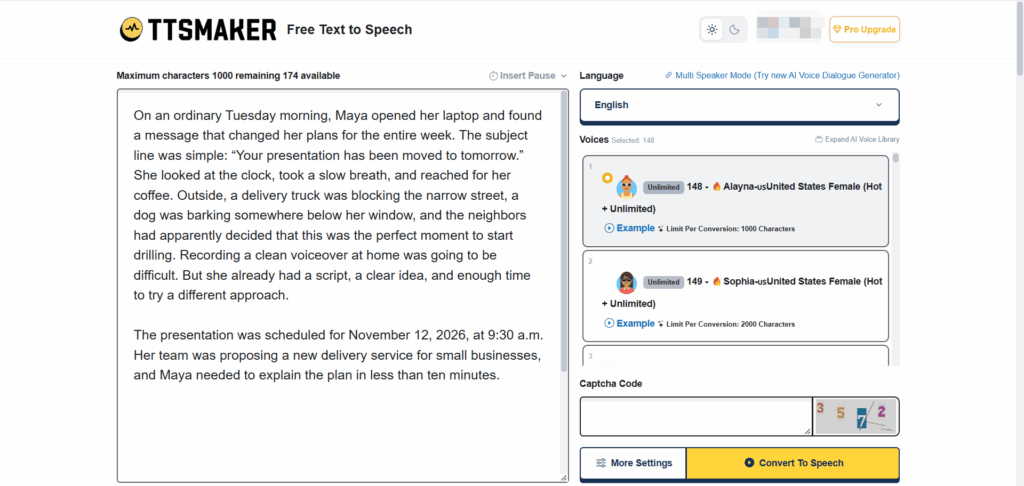
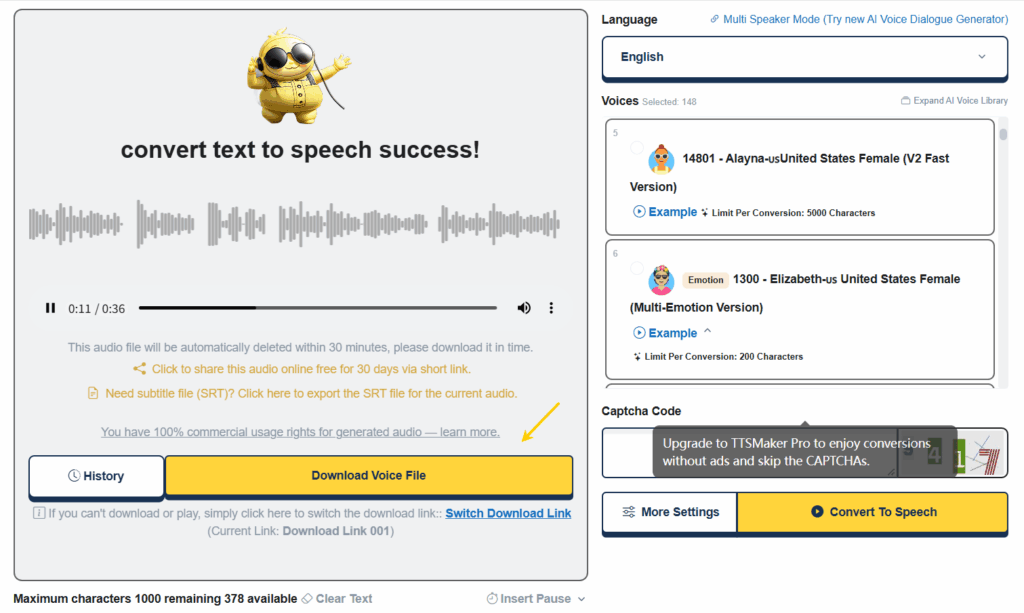
The test recording accompanying this review demonstrates that basic workflow. Using voice 148, Alayna, a U.S. English female voice, an approximately 826-character passage became a downloadable MP3 lasting about 50 seconds. The tester was pleased with the overall sound.
That is a useful result, with a specific scope. It demonstrates a successful short narration and download. It does not establish how every voice handles technical vocabulary, extended dialogue, or an entire chapter.
For occasional scripts of roughly that size, TTSMaker belongs on the shortlist.
When to Consider an Alternative
I start looking elsewhere when preparing the text becomes more work than producing the audio. Repeatedly cutting a script to fit a small input box may be tolerable for one video. Across a weekly publishing schedule, the same process creates extra files, transitions, and opportunities for mistakes.
Another reason to switch is voice fit. A pleasant narrator for an instructional paragraph might not deliver the urgency of an advertisement or the subtle changes needed in fiction. More available voices do not automatically solve that problem.
Before changing tools, though, check whether another TTSMaker voice or an appropriate paid plan addresses the actual limitation. Moving platforms is worthwhile when it improves the workflow you have, not simply because another product advertises a longer feature list.
What Can You Do with TTSMaker for Free?
Free Features and Voice Options
The basic process is familiar: enter text, choose a language and voice, complete the verification step, and generate speech. You can listen to the result before saving it.
There are also controls for shaping delivery. Depending on the voice and mode, these include speed, volume, pitch, and pauses. Those adjustments are valuable when a narration needs to fit a slide transition or give listeners time to absorb a number.
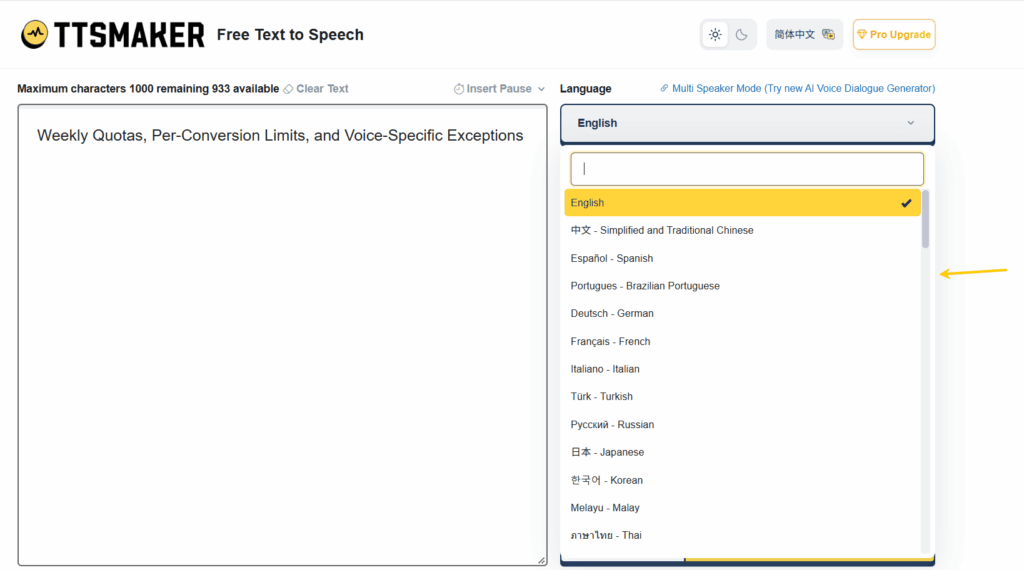
TTSMaker also has a separate multi-speaker generator. Its free version allows up to five dialogue blocks, 200 characters per block, and five dialogue generations per week. That makes it an option for a brief exchange, although it is a much tighter workspace than a paid dialogue project.
Weekly Quotas, Per-Conversion Limits, and Voice-Specific Exceptions
TTSMaker free limits operate at more than one level.
The standard allowance is 20,000 characters per week, with selected voices offering unlimited use under their own conditions. Separately, each conversion has an input ceiling. Having characters left in your weekly allowance does not mean a long script will fit into one request.
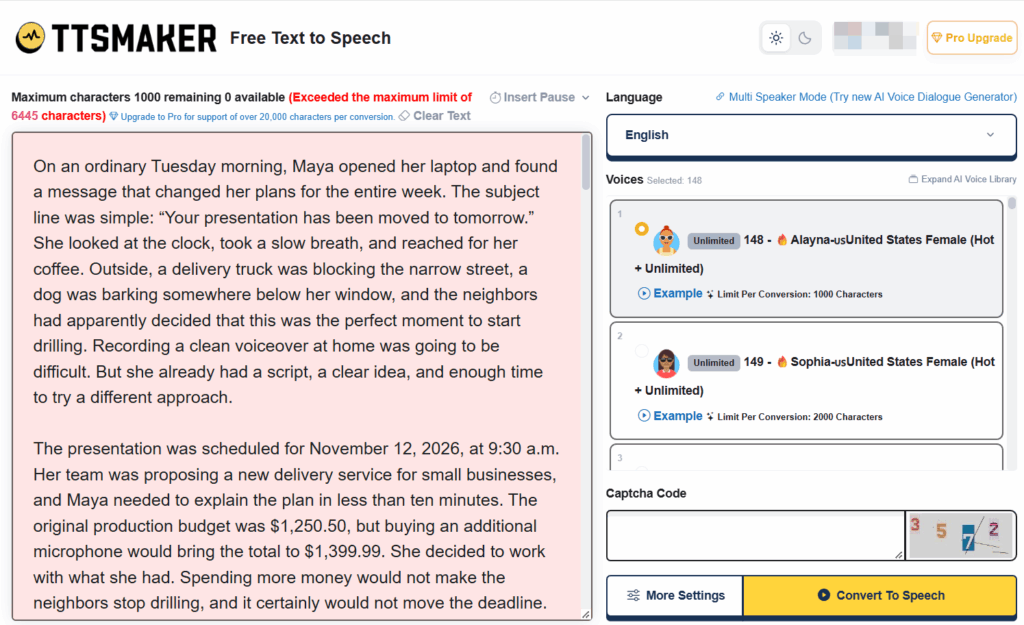
The recorded test makes this distinction especially clear. Alayna carried an Unlimited label but displayed a 1,000-character limit per conversion. The nearby Sophia voice displayed a 2,000-character limit. The full test script exceeded Alayna’s allowance, so it had to be shortened before generation.
The pricing page lists 500 characters per free conversion, which differs from those visible voice-specific limits. For planning a real project, I would use the limit shown beside the selected voice and leave room for revisions.
Paid plans increase capacity substantially. Listed monthly prices start at $13.99 for Lite, with 300,000 characters per month and up to 10,000 per conversion. Pro Mini and Pro Max offer larger monthly allowances and 20,000-character conversions; Studio raises the single-conversion ceiling to 30,000. Monthly subscription characters do not roll over.
Audio Downloads, File Availability, and Commercial Use
TTSMaker separates generating audio from downloading it. The free plan allows downloads, and the recorded test reached a saved MP3 without a payment interruption.
Save the file promptly. The free results page warns that generated audio is deleted within 30 minutes. Paid plans list longer conversion history, but neither arrangement should replace your own project storage.
Commercial permission is another meaningful advantage. TTSMaker grants broad rights to use generated audio in personal and commercial projects without requiring attribution. That is not the same as transferring ownership of its voice models or guaranteeing copyright ownership of every output.
It also does not clear rights to someone else’s script, music, or book. Permission to use the voiceover and permission to use the underlying material remain separate questions.
Is TTSMaker’s Voice Quality Good Enough for Your Project?
Choosing a Voice for Your Language, Accent, and Audience
“TTSMaker voice quality” is too broad a question to answer with one score. The useful question is whether a particular voice communicates your particular script effectively.
The Alayna sample produced a positive response from the tester. I would treat that as a reason to audition Alayna for similar English narration, rather than evidence that every voice is equally convincing.
For a U.S. audience, start with an appropriate American English voice, then listen for clarity and pacing. A voice that sounds impressive in a sample may become tiring across a longer explanation. Conversely, restrained delivery can work very well when the purpose is to explain something without distracting from the visuals.
Checking Names, Numbers, and Pronunciation
The best audition material comes from your actual project. Include the customer’s name, the product name, a price, and any abbreviation that must be understood correctly.
A sentence about a payment that “has not been processed” also deserves more attention than a decorative opening line. Losing a negation or placing emphasis poorly can change what a listener understands.
The supplied short test does not settle every pronunciation question in the longer draft. Before publishing technical or financial narration, I would check those passages individually rather than assume that an enjoyable opening predicts perfect accuracy throughout.
Adjusting Speed and Pauses Before Exporting
My preference is to edit a crowded sentence before accelerating the voice. Faster delivery can shorten a recording while making the information harder to follow.
Pauses often provide a more useful adjustment. Give a key result a moment to land, separate instructions, and leave space where the video changes direction. Pitch can alter the character of a voice, but it should not be mistaken for emotional performance.
For more expressive work, TTSMaker offers emotion controls on supported voices and eligible plans. Availability is voice-specific; upgrading does not make every narrator equally suitable for every role.
How to Turn Your Script into a Finished Voiceover
Prepare Your Text and Preview a Short Sample
The recorded workflow began with a long script and an over-limit warning. That is an avoidable interruption: choose the voice first, check its character ceiling, and then prepare the text around it.
Start with a representative passage rather than the easiest paragraph. A sample containing ordinary narration, one difficult name, and a number tells you more than a generic greeting.
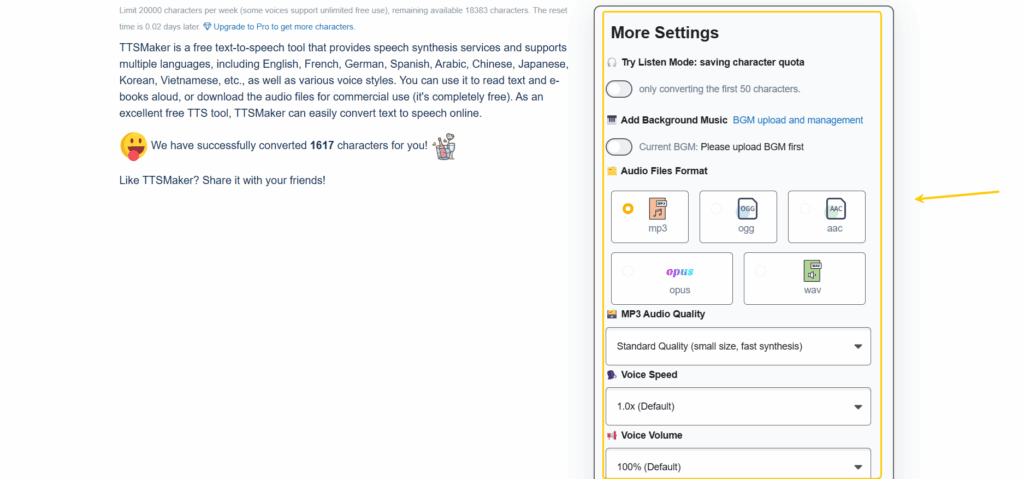
TTSMaker’s settings include a short listening mode intended to conserve characters. Regardless of how you preview, keep a record of the voice ID and settings once you find a combination you like.
Split Longer Scripts and Keep the Voice Consistent
When splitting is necessary, use complete ideas as your boundaries. Cutting at the end of a paragraph usually creates less repair work than stopping halfway through an explanation.
Keep the voice and settings consistent across sections. If one paragraph needs correction, replace that section and check both transitions around it. The new recording may fit the words while still creating an awkward pause in the assembled narration.
This is where the free workflow becomes less convenient. TTSMaker can produce the pieces, but you remain responsible for ordering files and making the finished sequence feel continuous.
Download and Check the Final Audio
The supplied MP3 was approximately 302 KB, with a 24 kHz sample rate, mono audio, and a 48 kbps bitrate. Those are properties of that particular export, not a specification for every TTSMaker output.
The recorded settings panel showed MP3, WAV, OGG, AAC, and OPUS options. The success screen also provided an SRT subtitle export link, although subtitle output was not tested.
Open the downloaded file outside the results page before considering the task finished. Check the ending, confirm that the entire passage is present, and save it with a useful name. If you need captions or a particular audio format, verify those deliverables separately.
TTSMaker vs. Text to Speech: A Quick Comparison
Input Options, Usage Limits, and Account Requirements
Text to Speech is a relevant alternative to evaluate when your starting material or input requirements differ from TTSMaker’s basic paste-and-generate workflow.
| Workflow question | TTSMaker | Text to Speech |
| How does a basic project start? | Enter or paste text and select a voice | Text entry, with file and article-link input options also presented |
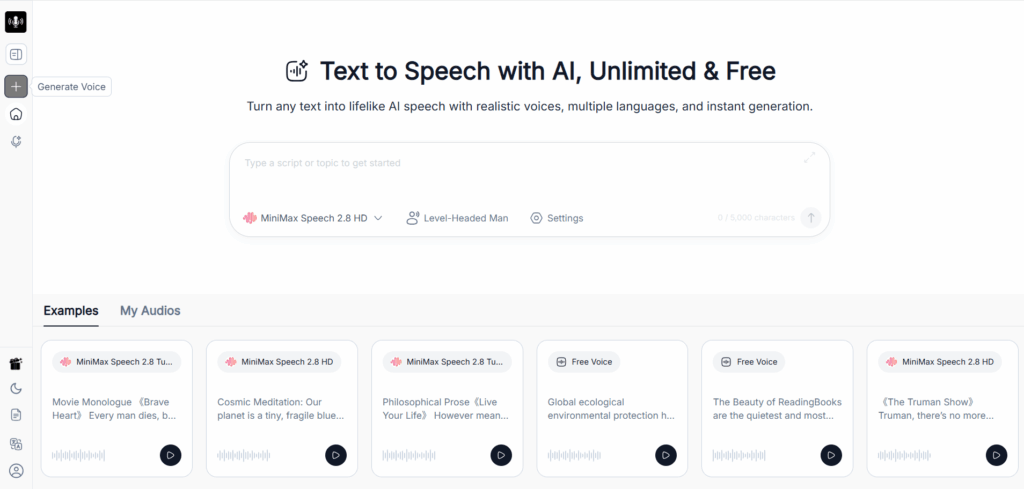
| What input limit is visible? | Voice-specific; Alayna showed 1,000 characters in the recorded test | The homepage text field displays a 5,000-character limit |
| Is there a free route? | Yes, with weekly and voice-specific conditions | A free-voice route is presented; other capabilities involve accounts or credits |
| Can it produce a downloadable file? | Yes; MP3 download was demonstrated | MP3 download is offered |
| Is there comparable hands-on evidence here? | A recorded short narration and downloaded file | No equivalent test accompanies this review |
The 5,000-character field makes Text to Speech worth checking for scripts that exceed the tested Alayna limit. It does not establish that every voice or input method follows the same allowance.
Voice Controls and Audio Downloads
TTSMaker gives you visible control over delivery and a clear route to a saved file. For Text to Speech, the next useful comparison is a matching project: the same passage, an appropriate voice, and the required download.
I would not declare a sound-quality winner without that comparison. A larger input field is helpful only if the resulting audio also meets the project’s requirements.
Text to Speech as a TTSMaker Alternative
Where It Fits in Your Voiceover Workflow
Text to Speech is most interesting here when copying and dividing material is the bottleneck. Its file and article-link options may fit a project that begins with a document or published page more naturally than manual text preparation.
For a short script that already works in TTSMaker, there may be little reason to move. For a longer source document, evaluating another input workflow is sensible before committing to repeated conversions.
That is the recommendation I can support: try the alternative where its workflow matches the job, rather than treating it as an automatic upgrade.
What to Check About Free Voices, Credits, and Input Limits
Text to Speech presents both free-use messaging and credit-based account features. Before moving a project, confirm which voice you intend to use, whether it consumes credits, and what limits apply to your chosen input method.
The same discipline applies to TTSMaker. Words such as “free” and “unlimited” need to be connected to a particular voice, mode, and task.
Which Tool Should You Choose?
For Occasional Short Voiceovers
TTSMaker is a sensible starting point. The recorded test shows the essential outcome: a short English passage became a downloadable file, and the tester liked the sound. If your own audition produces a similar result, there is no need to complicate the decision.
For Longer Scripts and Frequent Revisions
Compare the cost of a higher TTSMaker limit with the effort of managing separate recordings. Lite may address input length; Pro adds capabilities such as dialogue projects and API access.
Text to Speech is also worth evaluating, particularly when its input options reduce preparation. Choose based on the complete production process, including revisions and export.
For Projects That Need More Voice or Input Options
Let the difficult part of the project decide. Dialogue needs differ from document narration, and expressive advertising differs from straightforward instructions.
I would rather use a modest tool that handles the exact script reliably than pay for capabilities that never improve the finished recording.
Frequently Asked Questions
Why Does TTSMaker Reject Text Below My Remaining Weekly Quota?
The weekly allowance and per-conversion limit are separate. Your selected voice may accept only a short passage even when plenty of weekly characters remain.
Does Regenerating Audio Use More Characters?
For metered voices, budget for another conversion when regenerating. Do not assume corrections are free. Selected unlimited web voices have separate conditions, while API conversions deduct characters for all voices.
What Can I Do If My TTSMaker Download Link Expires?
The temporary file may no longer be recoverable. Keep the script and settings so you can regenerate it if necessary, and download future results immediately.
Does TTSMaker’s Commercial License Guarantee YouTube Monetization?
No. Commercial permission covers your use of TTSMaker’s generated audio. YouTube separately evaluates content under its own monetization rules, and rights to scripts, music, and other assets still need to be addressed.
Conclusion
TTSMaker earns its place as a practical option for short, downloadable voiceovers. The recorded Alayna test produced a roughly 50-second MP3, and the tester was happy with the result. That gives me a concrete reason to recommend trying it with your own script before paying for another tool.
The main consideration is how comfortably your project fits its limits. An Unlimited label does not remove the per-conversion ceiling, and longer scripts can introduce splitting, regeneration, and assembly work. If that becomes a recurring burden, compare a paid TTSMaker plan with an alternative such as Text to Speech, particularly if file or article-link input would simplify preparation.
My recommendation is to start with your most demanding paragraph. Choose the tool that reads it clearly, gives you the controls you need, and gets you to a usable download with the least extra work.